PII Fields Setting
In the IVMS101 standard, over 90 fields are defined to specify the mandatory and optional information that two VASPs transmit during a Travel Rule request. However, not all VASPs support every field. On account of this, GTR provides a mechanism for all VASPs connected to GTR to clearly understand each other's minimum compliance requirements. To facilitate this, GTR has introduced below two concepts:
-
PII Verification Support: a list of IVMS PII fields that the PII Receiving VASP can assist with validating.
-
Expected PII Preference: a list of IVMS PII fields that the PII Receiving VASP is expected to receive in the PII payload.
Let's consider a scenario where the Travel Rule Initiating VASP is compiling a list of IVMS PII fields into a payload. The PII Receiving VASP's Expected PII Preferences tells the Travel Rule Initiating VASP which fields must be included in this payload. Additionally, the PII Receiving VASP's PII Verification Support indicates the capabilities that the PII Receiving VASP is supposed to help verify these PII fields.
PII Verification Support vs Expected PII Preference — what's the difference?
| Aspect | PII Verification Support | Expected PII Preference |
|---|---|---|
| What you tell counterparties | I can verify these fields | I expect to receive these fields |
| Nature | Capability declaration | Requirement declaration |
| Affects Travel Rule requests? | No — only determines the verification result you return (match / mismatch) | Missing fields will probably result in the Travel Rule failure |
PII Verification Support
PII Verification Support is a list of IVMS fields that are expected to be disclosed to the Travel Rule Initiating VASP. This is designed to give the Travel Rule Initiating VASP a clear understanding of which fields the PII Receiving VASP can validate and which it cannot.
GTR listed the most commonly used IVMS field and allowed every VASP to configure their own PII Verification Support list.
To manage this setting, log in to the GTR website and navigate to [My Account] > [Settings] > [Compliance] > [PII Verification Support].
In simple terms, this allows the PII Receiving VASP to tell the PII Sending VASP: "These are the PII fields I will compare and return results for. Other fields will still be received but no verification result will be returned for them."
Why configure PII Verification Support?
When other exchanges send you Travel Rule requests, they want to know which customer fields you can confirm match your records (e.g., 'Yes, the name matches' or 'No, mismatch'). Without configuring this list, sending exchanges have no idea what verification feedback they will get from you — leading to inconsistent communication, support tickets, and slower transactions.
High level Flow
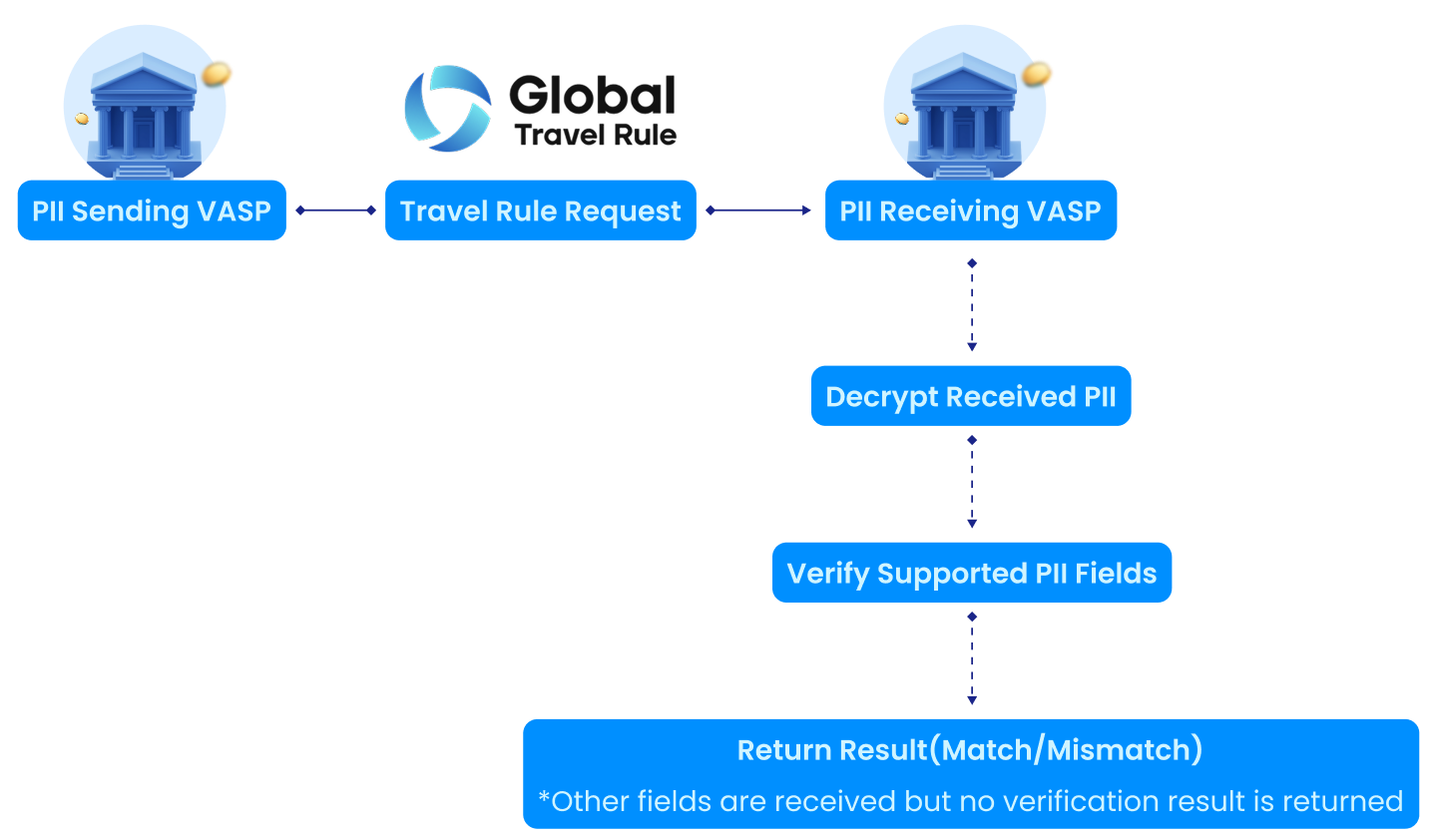
Example
Let's take this as an example:
-
PII Sending VASP provides PII fields:
- Name
- Wallet Address
- Country of Residence
- Date of Birth
- Place of Birth
- National ID
-
PII Receiving VASP configures Verification Support for:
- Name,
- Wallet Address
- Country of Residence
Above example will result:
- Name: verification result returned as match/mismatch
- Wallet Address: verification result returned as match/mismatch
- Country of Residence: verification result returned as match/mismatch
- Date of Birth / Place of Birth / National ID: received but no verification result returned, as PII Receiving VASP not support them
Best Practice Recommendations
Fields tagged Recommended represent FATF R.16 minimum verification capabilities. At minimum, your VASP should support:
| Type | PII Verification Support Fields |
|---|---|
| Natural Person | Name, Country of Residence, Account Number |
| Legal Entity | Name, Country of Registration, Account Number |
- Additional fields (e.g., Date of Birth, National ID) can be included depending on your regulatory requirements or business needs.
- Your settings are visible to VASPs connected to GTR Network, so they know which fields are expected to return match / mismatch verification results when they are sending PII to you.
Expected PII Preferences
Expected PII Preferences allow you to specify which PII fields you expect to receive from the Travel Rule initiator — the exchange that sends the Travel Rule request and transmits PII data.
GTR provides approximately 70 commonly used PII fields for every VASP to decide their exclusive Expected PII Preferences list, in accordance with the instructions of IVMS and FATF.
On GTR, these fields are organized:
- Person Type: Natural Person or Legal Person
- Direction: Originator or Beneficiary
- Category: Fields are grouped into categories for easier navigation:
- Common Fields: Name, Date of Birth, Place of Birth, Account Number, Customer ID, etc.
- Identification (Natural Person): Country of Residence, National ID, National ID Type, Country of Issue
- Registration (Legal Person): Country of Registration, National Identifier, Registration Authority, etc.
- Address Fields: Country, Town, Street, Post Code, Building Number, etc.
To manage this setting, log in to the GTR website and navigate to [My Account] > [Settings] > [Compliance] > [Expected PII Preferences].
In simple terms, this is the PII Receiving VASP telling the PII Sending VASP: "When you send me a Travel Rule request, you must at least include these Originator / Beneficiary PII fields in the request."
Why configure Expected PII Preferences?
Different jurisdictions require different customer information. This setting lets you tell other exchanges in advance: 'When sending me a Travel Rule request, please include these fields so I can complete my compliance checks.' Configuring this gives the sending exchange clear guidance, reducing back-and-forth on missing information and helping you collect what your regulator expects.
High level Flow
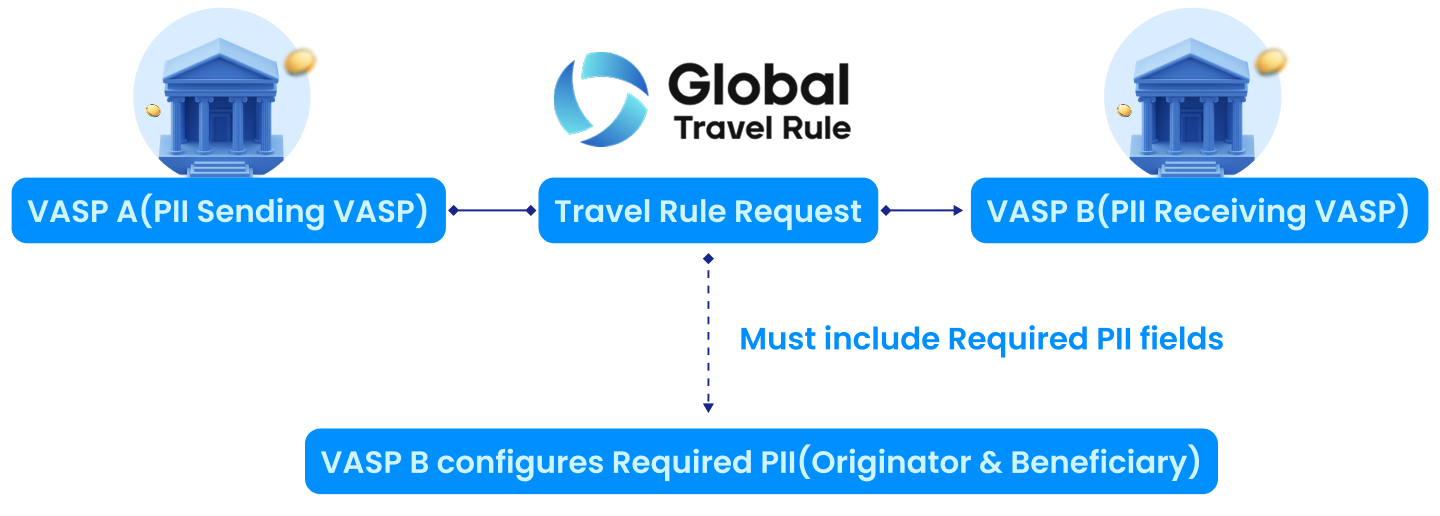
- VASP B pre-defined the Expected PII Preferences fields.
- VASP A must include all of them in the Travel Rule request.
- Missing fields will probably result in the request failure.
Example
Let's take this as an example:
-
VASP B (the PII Receiving VASP) sets the Expected PII Preferences as:
- Originator: Name, Wallet Address, National ID
- Beneficiary: Name, Date of Birth
-
VASP A (the PII Sending VASP) actually sends below in its Travel Rule request:
- Originator: Name, Wallet Address
- Beneficiary: Name
Travel Rule request result: Probably Fail, due to the missing of Originator's National ID and Beneficiary's Date of Birth.
Best Practice Recommendations
When configuring Expected PII Preferences:
- Too strict means higher chance of request failures, harder for counterparties to comply.
- Too loose means higher success rate but increased regulatory risk.
- Minimally, your VASP should require:
Natural Person — Recommended Fields:
| Type | PII Fields |
|---|---|
| Originator | Name, Account Number, Country of Residence |
| Beneficiary | Name, Country of Residence |
Legal Person — Recommended Fields:
| Type | PII Fields |
|---|---|
| Originator | Legal Person Name, Account Number, Country of Registration |
| Beneficiary | Legal Person Name, Account Number, Country of Registration |
- Additional fields may be required depending on jurisdiction:
- National ID / Passport No.
- Date of Birth
Alternative Requirements (OR Logic)
In addition to selecting individual required fields, you can create Alternative Requirements to express flexible conditions where the Travel Rule initiator only needs to provide ONE of the specified options.
- Each Alternative Requirement contains 2~6 Options.
- Options are connected by OR logic — only one option needs to be satisfied.
- Within each option, multiple fields are connected by AND logic — all fields in that option must be provided together.
- You can create up to 3 Alternative Requirements per configuration.
This is useful for complex regulatory requirements like the EU Transfer of Funds Regulation, where multiple forms of identification are acceptable.
Example
VASP B (the PII Receiving VASP) configures Expected PII Preferences:
- Required Fields: Full Name, Account Number, Country of Residence
- Alternative Requirement:
- Option A: Customer ID
- Option B: Date of Birth AND Place of Birth
VASP A (the PII Sending VASP) sends:
- Name: John Smith
- Account Number: 0x1234...abcd
- Country of Residence: US
- Date of Birth: 1990-01-15
- Place of Birth: New York, US
Result: Success — VASP A meets all required fields and satisfies the Alternative Requirement of Option B: Date of Birth + Place of Birth.